Prompt tạo infographic tổng hợp 20 prompt chỉnh sửa ảnh bằng AI (cheat sheet)
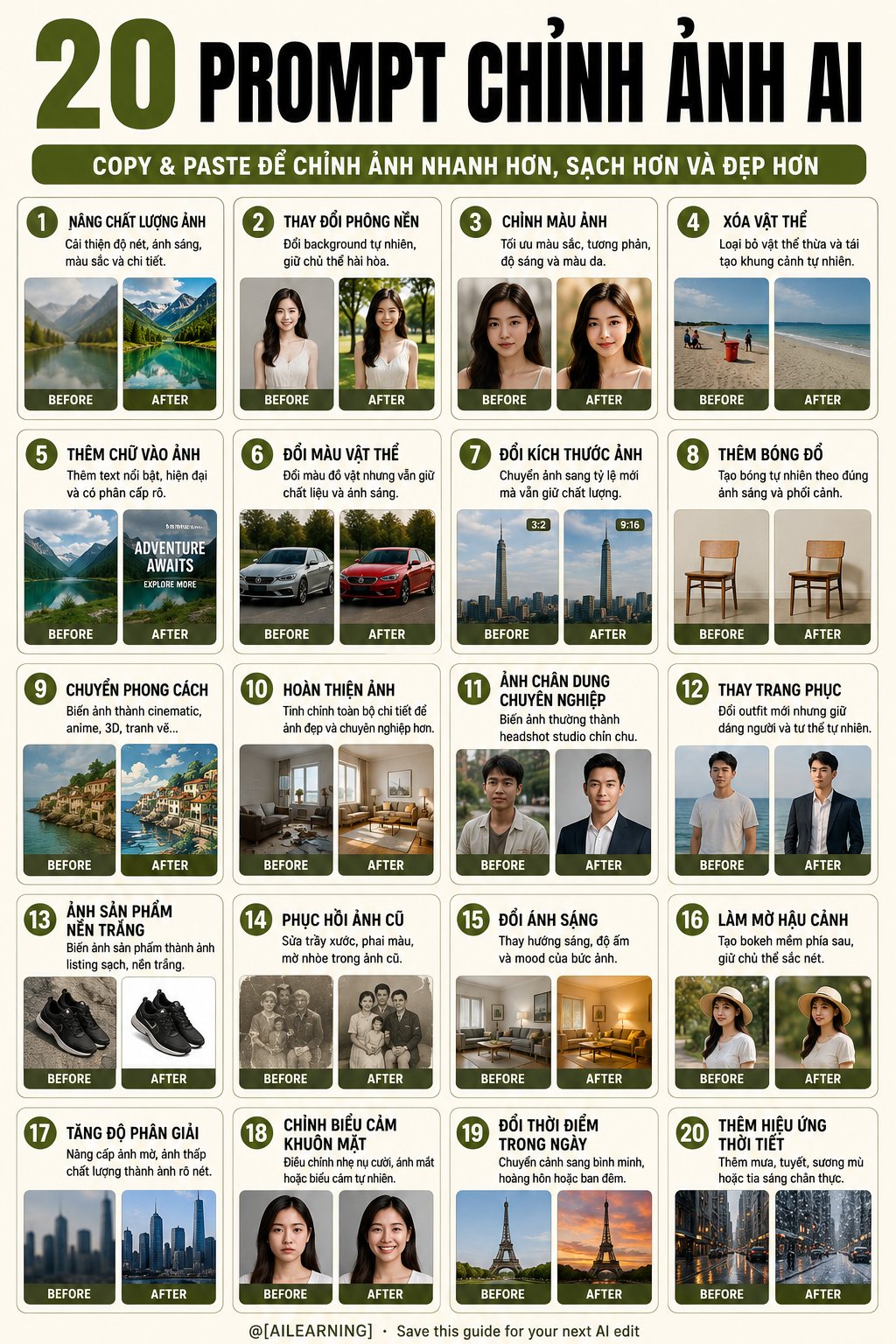
Poster infographic tổng hợp 20 prompt chỉnh sửa ảnh bằng AI, mỗi mục có tiêu đề, mô tả ngắn và ví dụ before/after minh hoạ rõ ràng. Thiết kế dạng cheat sheet gọn gàng, dễ lưu lại và áp dụng ngay.
Create a clean premium educational infographic poster titled “20 AI IMAGE EDITING PROMPTS”. Design format: Vertical 4:5 infographic poster, clean educational layout, modern AI tutorial cheat sheet, highly readable, premium social media design. Main concept: A practical visual guide showing 20 AI image editing prompt ideas, each with a short description and a simple before/after example image. Overall style: Minimal, clean, professional, modern, practical, easy to read. Use a soft ivory or warm white background. Use olive green, black, charcoal gray, and light gray as the main color palette. Use rounded cards, thin borders, clean spacing, and consistent layout. Poster header: At the very top, create a large bold headline: “20 AI IMAGE EDITING PROMPTS” Typography: - Make “20” very large, bold, and olive green. - Make “AI IMAGE EDITING PROMPTS” bold, uppercase, black, condensed sans-serif. - Strong visual hierarchy, centered at the top. Sub-header bar: Below the main headline, add a rounded olive-green horizontal pill-shaped bar with white uppercase text: “COPY & PASTE THESE PROMPTS TO EDIT ANY PHOTO FASTER AND CLEANER” Main content layout: Create exactly 20 individual prompt cards arranged in a 4-column by 5-row grid. Each card must include: - a circular olive-green number badge at the top-left; - a bold uppercase title; - a short practical description; - two small image boxes labeled “BEFORE” and “AFTER”; - simple realistic visual examples that clearly show the editing result. Card style: White or warm-white card background, rounded corners, thin olive-gray border, subtle shadow, clean margins, consistent spacing. The card design must be uniform across all 20 cards. Use these 20 cards: Card 1: Number: “1” Title: “ENHANCE IMAGE QUALITY” Description: “Improve sharpness, lighting, colors, and details for maximum clarity and realism.” Before/After example: a slightly dull portrait becomes sharper, brighter, and cleaner. Card 2: Number: “2” Title: “CHANGE BACKGROUND” Description: “Replace the background seamlessly while keeping the subject natural.” Before/After example: a person on a plain background becomes placed in a natural mountain or outdoor scene. Card 3: Number: “3” Title: “COLOR CORRECTION” Description: “Optimize colors, contrast, brightness, and skin tones for a vibrant balanced look.” Before/After example: a cool dull portrait becomes warm, balanced, and professional. Card 4: Number: “4” Title: “REMOVE OBJECTS” Description: “Remove unwanted objects or people and reconstruct the scene naturally.” Before/After example: a portrait with distracting objects becomes clean and uncluttered. Card 5: Number: “5” Title: “ADD TEXT TO IMAGE” Description: “Add bold modern text with strong hierarchy that enhances impact.” Before/After example: a landscape photo becomes a travel poster with bold text. Card 6: Number: “6” Title: “CHANGE COLORS” Description: “Change colors of objects while keeping textures, lighting, and realism intact.” Before/After example: a red backpack becomes an olive-green backpack. Card 7: Number: “7” Title: “RESIZE IMAGE” Description: “Resize to any dimension or aspect ratio while preserving quality.” Before/After example: a landscape image becomes extended into a wider or taller format. Card 8: Number: “8” Title: “ADD REALISTIC SHADOWS” Description: “Add natural shadows that match the lighting, perspective, and depth.” Before/After example: a white product cup gains a realistic soft shadow. Card 9: Number: “9” Title: “TRANSFORM STYLE” Description: “Turn the image into a cinematic, anime, 3D, painting, or artistic style.” Before/After example: a portrait becomes a stylized illustrated version. Card 10: Number: “10” Title: “MAKE IT PERFECT” Description: “Refine every detail for a flawless, professional, high-quality final result.” Before/After example: an interior room becomes cleaner, brighter, and more luxurious. Card 11: Number: “11” Title: “PROFESSIONAL HEADSHOT” Description: “Turn any casual photo into a polished studio headshot with clean background.” Before/After example: a casual portrait becomes a professional business headshot. Card 12: Number: “12” Title: “CHANGE OUTFIT” Description: “Replace clothing with a new outfit while keeping body posture natural.” Before/After example: a casual shirt becomes a formal business suit. Card 13: Number: “13” Title: “WHITEN PRODUCT SHOT” Description: “Turn any product photo into a clean white-background listing image.” Before/After example: a watch or product becomes isolated on a white e-commerce background. Card 14: Number: “14” Title: “RESTORE OLD PHOTO” Description: “Repair scratches, fading, and blur from an old photo while keeping original details.” Before/After example: an old damaged portrait becomes clean and restored. Card 15: Number: “15” Title: “RELIGHT SCENE” Description: “Change the lighting direction, warmth, or mood of a photo.” Before/After example: a dark lamp scene becomes warmer and more cinematic. Card 16: Number: “16” Title: “BLUR BACKGROUND” Description: “Add a soft cinematic blur behind the subject while keeping the subject sharp.” Before/After example: a portrait gains realistic background bokeh. Card 17: Number: “17” Title: “UPSCALE RESOLUTION” Description: “Increase resolution and sharpness of low-quality images while keeping natural details.” Before/After example: a blurry landscape becomes crisp and high-resolution. Card 18: Number: “18” Title: “FIX FACIAL EXPRESSION” Description: “Adjust facial expression slightly, such as a smile or open eyes, naturally.” Before/After example: a neutral face becomes a natural gentle smile. Card 19: Number: “19” Title: “CHANGE TIME OF DAY” Description: “Shift the scene lighting to sunrise, sunset, or night without changing setup.” Before/After example: a daytime city becomes a warm sunset cityscape. Card 20: Number: “20” Title: “ADD WEATHER EFFECT” Description: “Add rain, snow, fog, or light rays while keeping the subject and setting realistic.” Before/After example: a road or forest scene gains realistic fog and rain. Image style inside cards: Use small realistic before/after thumbnails. Keep examples simple and visually clear. Use consistent lighting and professional photo quality. Make the before/after difference obvious but realistic. Footer: At the bottom, add a small subtle brand line: “@[BRAND HANDLE] · Save this guide for your next AI edit” Footer style: Small, centered, charcoal gray or olive green, clean sans-serif. Typography requirements: Use bold uppercase titles, readable short descriptions, clean sans-serif font, consistent spacing. Make all text clear, sharp, and readable. Composition requirements: Balanced margins, clean grid, no clutter, strong hierarchy, professional infographic design, premium AI education poster look. Negative constraints: No distorted text, no fake words, no unreadable letters, no random logos, no messy layout, no inconsistent card sizes, no overlapping text, no extra cards, no missing cards, no watermark, no cluttered background. Aspect ratio: 4:5 vertical. Resolution: Ultra-high resolution, premium social media infographic quality.
Nhận prompt mới mỗi ngày — miễn phí: